Activity Monitor for Your Local AI Agents
A free, open-source Mac app that shows you every Claude Code, Codex and Cursor process running — which project it belongs to, how long you have really left it sitting there, and what it is costing you.
macOS 13+ · MIT · no permissions, no telemetry, no network code
Five rows named after a version number. Which one is the session you abandoned last Tuesday?
The same processes, named by the project each one is sitting in.
Fifteen agents. Eleven projects. One list that makes sense.
Corral supports Claude Code, Claude for desktop, Codex, Cursor and its CLI agent, and Windsurf.
The project, not the version
Claude Code installs itself as ~/.local/share/claude/versions/2.1.228, so the process name is the version. Corral reads each process's working directory instead, and the list reads heroshot, recall, appcleaner.
Idle time you can trust
Not “quiet since this app opened”. Corral reads the last write to each agent's terminal, which the kernel has been stamping all along — so an agent you walked away from on Tuesday says idle 3.1d the first second you look.
The whole footprint
Every agent's children too: MCP servers, dev servers still holding port 3000, and the caffeinate each session starts — which is why a pile of forgotten agents is also a Mac that never sleeps.
Stops things properly
Quit asks, Force Quit insists, and either way the children go first. Kill the agent alone and its MCP servers are reparented to launchd, where they sit forever with nobody to talk to.
Clears what they leave behind
Caches, superseded versions, VM images and logs, grouped by what removal actually costs you — and never your conversation history. On one real machine that came to 14 GB.
Costs nothing to run
A refresh takes about 8 ms across 550 processes — 0.4% of one core. A monitor that shows you what is eating your CPU has no business being on that list, so the number is measured, not assumed.
$ corral --list --search recall

  2 of 17 agents match "recall"

  Claude Code 2.1.228  ·  pid 298
    project   ~/code/recall
    up        5.5d    cpu 2.0m    mem 185 MB    idle 16.2h
    tty       /dev/ttys005
    children  4 — mcp-server (pid 324), node (pid 325), …
What is left, and what they left behind.
Two more tabs in the same window: how much of each plan you have used, and the gigabytes the tools leave on disk.
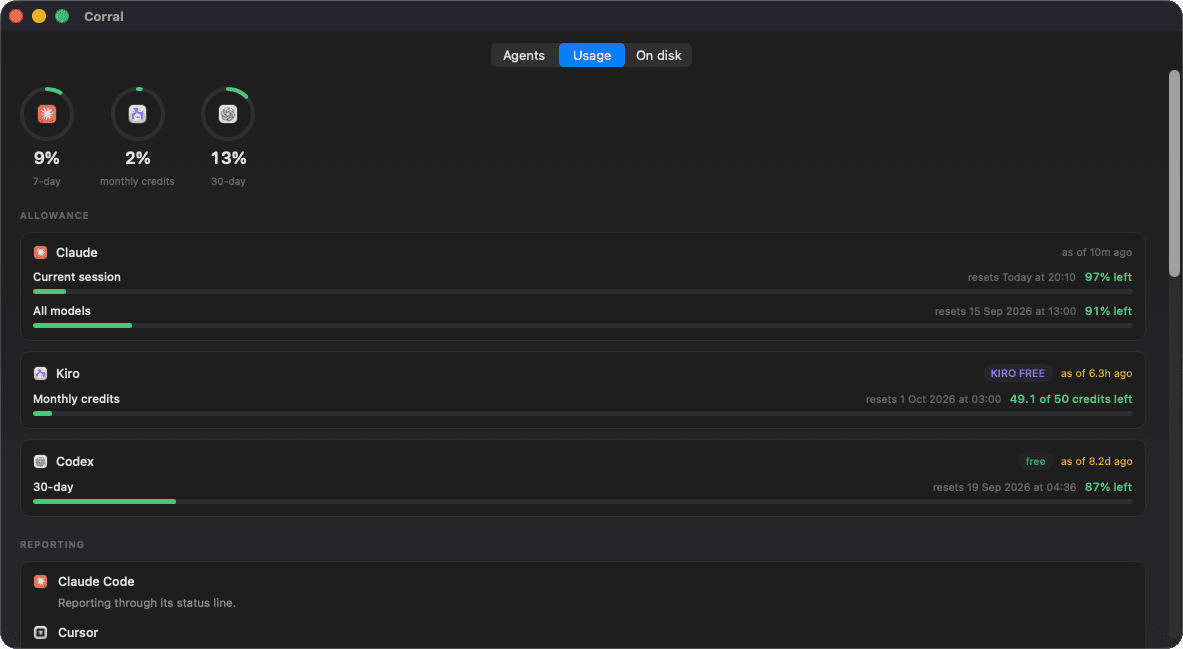
Usage
What is left of each plan and when it refills, and how full each conversation is. Codex reports on its own; Claude Code and Cursor through a status line Corral sets up for you, after showing you the exact setting.
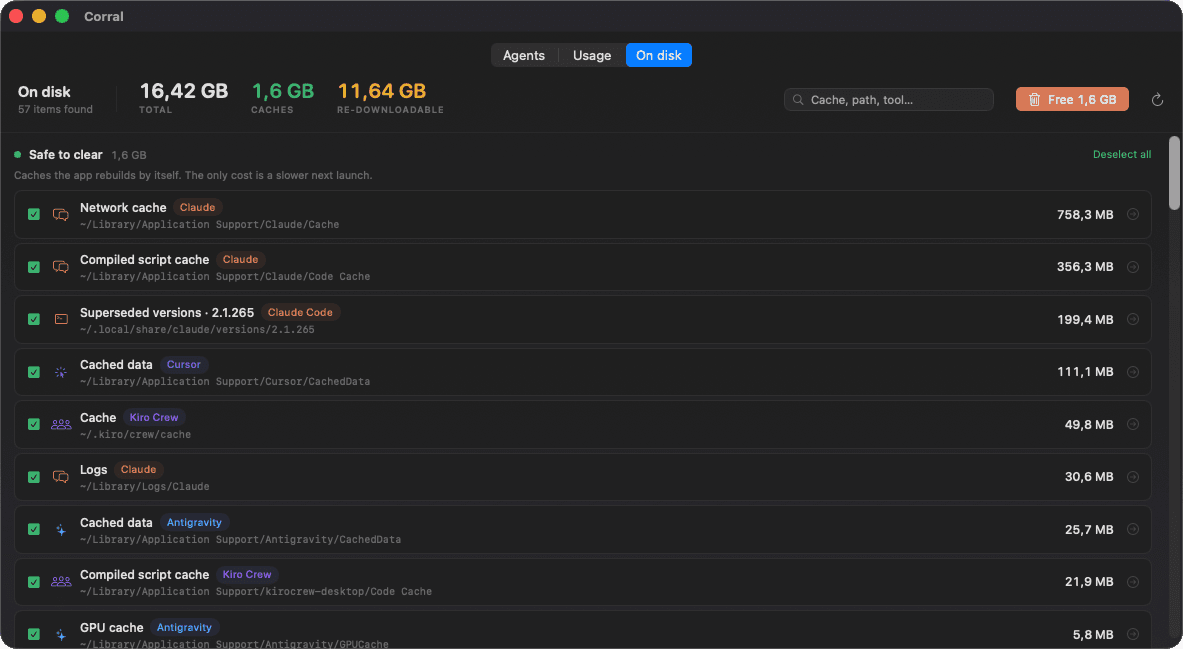
On disk
Caches, superseded versions and VM images in three groups: safe to clear, will be downloaded again, and your data. Only the first is ticked for you, a version still running is never offered, and everything goes to the Trash.
Insights
How you work with agents, in numbers you can check.
The transcripts already know: every prompt, every test run, every time you stopped the agent and turned it around. Insights reads your Claude Code and Codex sessions and your git history, on your Mac, and shows the last 7, 30 or 90 days.
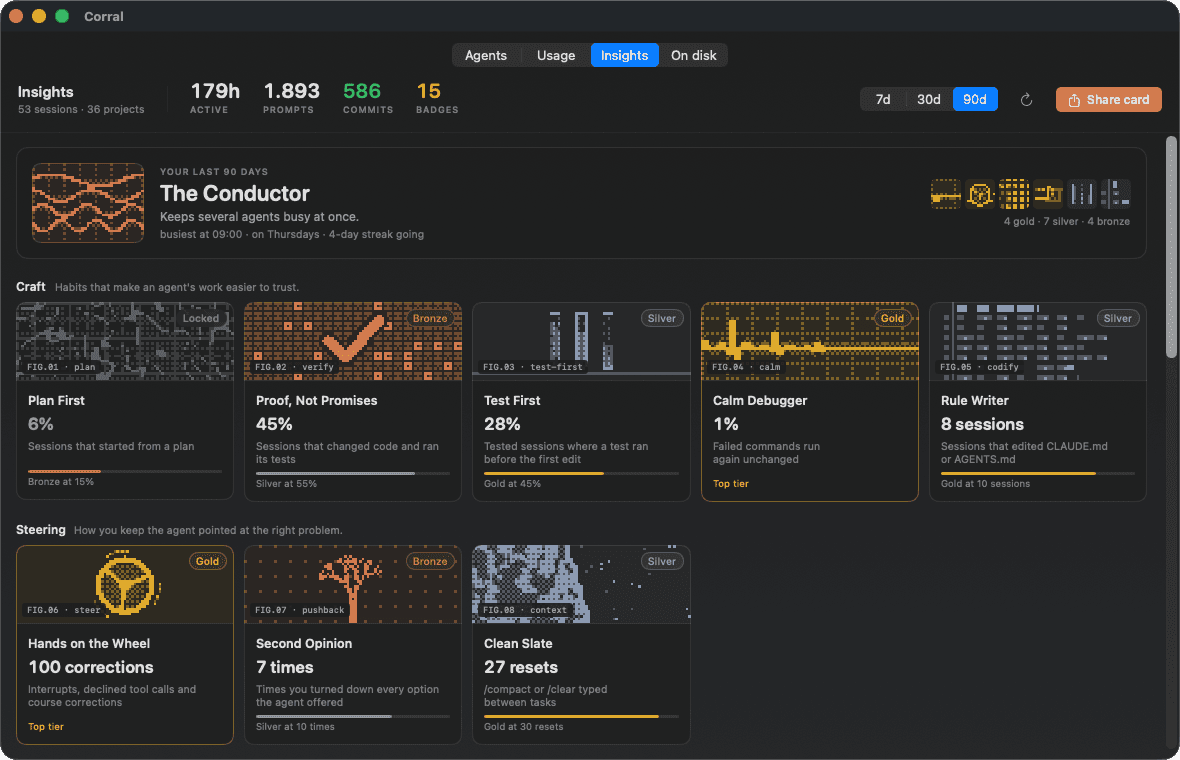
FIG.01 · badges
Nineteen habits, three bars each
Craft, steering, orchestration, output and rhythm, each badge with a bronze, silver and gold bar. It says what it measured and what the next tier needs, and one with too few sessions behind it stays locked rather than guessing.
FIG.02 · archetype
An archetype that is yours
The Architect, the Verifier, the Conductor, the Navigator, the Shipper or the Night Owl: whichever group of badges you are strongest in. Under them, Next names one thing to try for each habit still below silver.
FIG.03 · plates
Pictures drawn from your numbers
Every badge has a small generative scene printed through an 8×8 Bayer dither, like a one-bit screen. The conductor has as many waves as you ran agents at once; the streak's flame grows with the streak.
FIG.04 · card
A card worth posting
Share card draws your archetype and best five badges at 1200×630, ready for X, LinkedIn or a PNG. No project names and no prompts are on it, and it goes nowhere until you send it.
Prompts in English and Turkish both count. Nothing it reads leaves your Mac. In the terminal: corral --insights
Round them up, get your Mac back.
Free, open source, and it asks for no permissions at all. Open it once and find out how many agents you have been leaving running.